Sending condolences online as a group means everyone adds their own message to one card, from wherever they are, and it arrives together instead of as a dozen separate texts. Here’s how to set one up in a few minutes, whether you’re organizing it for coworkers, friends, or family.

Why send condolences as a group
A virtual sympathy card lets everyone who cares about the person add a note, without anyone needing to coordinate schedules or pass a physical greeting card around an office. It works just as well for a team spread across time zones as it does for family who live nearby, and it’s a simple way to send a sympathy card online during a difficult time without requiring a special account or app for anyone to sign.
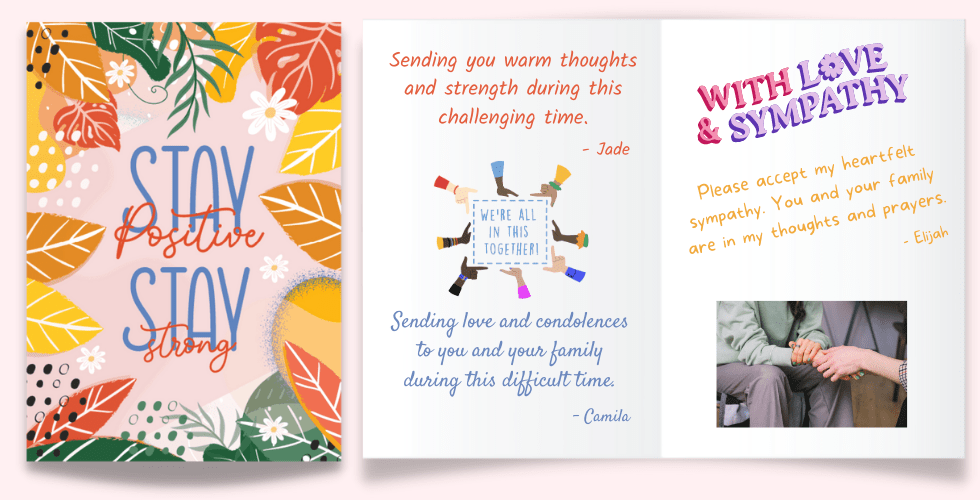
Unlike a single paper card passed around a desk, a group ecard can hold as many messages as people want to add, along with photos or a GIF, and everyone can see it come together in real time. If you’re sending on behalf of a workplace, an online sympathy card for coworkers is often the simplest way to make sure the whole team is represented, even the people working from home that week.
How to send a sympathy card from a group, step by step
- Pick a design template, or upload your own. A rotating selection of designs is free, each marked with a Free banner. Other templates are $4.99, paid once by whoever’s organizing the card, not by each signer. You can also upload a photo or your own artwork if you’d rather use that.
- Add the recipient’s details and pick a delivery date and time. Choose when you want the card to arrive. You can send it right away or schedule it for later in the day.
- Check out. This step happens before anyone else can sign, since checkout is what creates the card’s signing link.
- Share the signing link with everyone you want to include. Send it via email, text, or Slack. No one needs to make an account to add a message, and unlimited people can sign. If you’re the one organizing it, add your own heartfelt message first. It sets the tone and makes the invite feel less like a form to fill out.
- Everyone adds a message, and a photo, GIF, or video if they want. Unlimited messages means nobody has to keep theirs short to make room for someone else. As messages come in, anyone with the link can see who’s signed so far, which makes it easy to follow up with anyone who hasn’t gotten to it yet.
- The card is emailed to the recipient at the time you scheduled. No further action needed from you or the signers once it’s sent.
- The recipient can download a printable PDF. That gives them a keepsake they can print or save, on top of the online version they can revisit any time.

Sending an online sympathy card for coworkers this way works for a group of three close friends just as well as it does for a larger team of thirty, since every signer adds their own message independently instead of waiting their turn.
Group sympathy card etiquette
A few guidelines keep a group card feeling genuine instead of generic.
- Keep it personal, not identical. Nobody needs to match anyone else’s message length. A single honest sentence is enough if that’s all you have to offer.
- Skip comparisons. Even with good intentions, “I know exactly how you feel” can land wrong. Stick to what you’re actually feeling and offering.
- Mind religious language. Not everyone shares the same beliefs, so a phrase like “in a better place now” might not fit every recipient. When in doubt, keep your message secular.
- Let the organizer go first. Whoever starts the card should add their own message before sharing the signing link. It shows everyone else what tone to aim for and makes the invite feel less like a blank form.
- Don’t wait for everyone to finish before scheduling. Set a delivery date a few days out so the card still arrives while it means the most, even if a couple of people haven’t added their message yet.
What to say in a sympathy card from a group
Keep your message short and sincere. Name the loss if you know the details, offer support in a specific way rather than a general “let me know if you need anything,” and sign your own name so it reads as personal. For real examples you can adapt, including what to write for the loss of a parent, spouse, sibling, or pet, see our full guide to condolence messages for a sympathy card. If you’re writing for a colleague, our sympathy messages for coworkers guide has wording that fits a workplace relationship specifically.
Would you like to send your condolence messages together as a group? Try sympathy ecards that everyone can add comfort and support to online.
For a comforting animation to pair with your message, browse our sympathy GIFs.
The bottom line
A group sympathy ecard gives everyone who cares about the person a way to say so, in their own words, on one card the recipient can revisit whenever they need to. It takes a few minutes to set up, works whether your group is in one office or spread across the country, and leaves the recipient with a printable keepsake on top of the version they can revisit online. Nobody needs an account to sign, nobody has to wait their turn, and the organizer only pays once regardless of how many people add a message. If you’re ready to put one together, start a sympathy card and share the link with everyone you’d like to include.
Frequently asked questions
How do you write a sympathy card from a group?
Each person adds their own short message in their own words. There's no need to coordinate what everyone says. A card with several honest, individual notes, even a single line each, means more to the recipient than one long message everyone signed off on.
How do you create a virtual sympathy card?
Pick a design or upload your own, add the recipient's name and a delivery date, and check out. That generates a signing link you share with everyone who wants to add a message. No account is required to sign.
When is it appropriate to send an online condolence card?
As soon as you hear the news. A short message sent within a day or two of learning about a loss means more than a longer one sent weeks later. If you're organizing on behalf of a group, start the card right away and give everyone a few days to add their message before it's sent.
How do I see who has signed a group sympathy card?
Everyone who's added to a GreetPool card can see the messages and names already on it as they're added, so the organizer or any signer can check who's contributed so far and gently nudge anyone who hasn't.
What's the best way to offer condolences in a group bereavement card?
Keep it simple and sincere. Name the loss if you know the details, share one specific memory if you have one, and offer support in a concrete way rather than a vague open-ended offer. Avoid comparing the loss to your own experience.
Is a virtual sympathy card appropriate for a coworker?
Yes. A virtual card is often the easiest way for a whole team or department to send condolences together, especially when people work remotely or across offices. See our guide to sympathy messages for coworkers for wording that fits a workplace relationship.